What is an Online HTML Compiler?
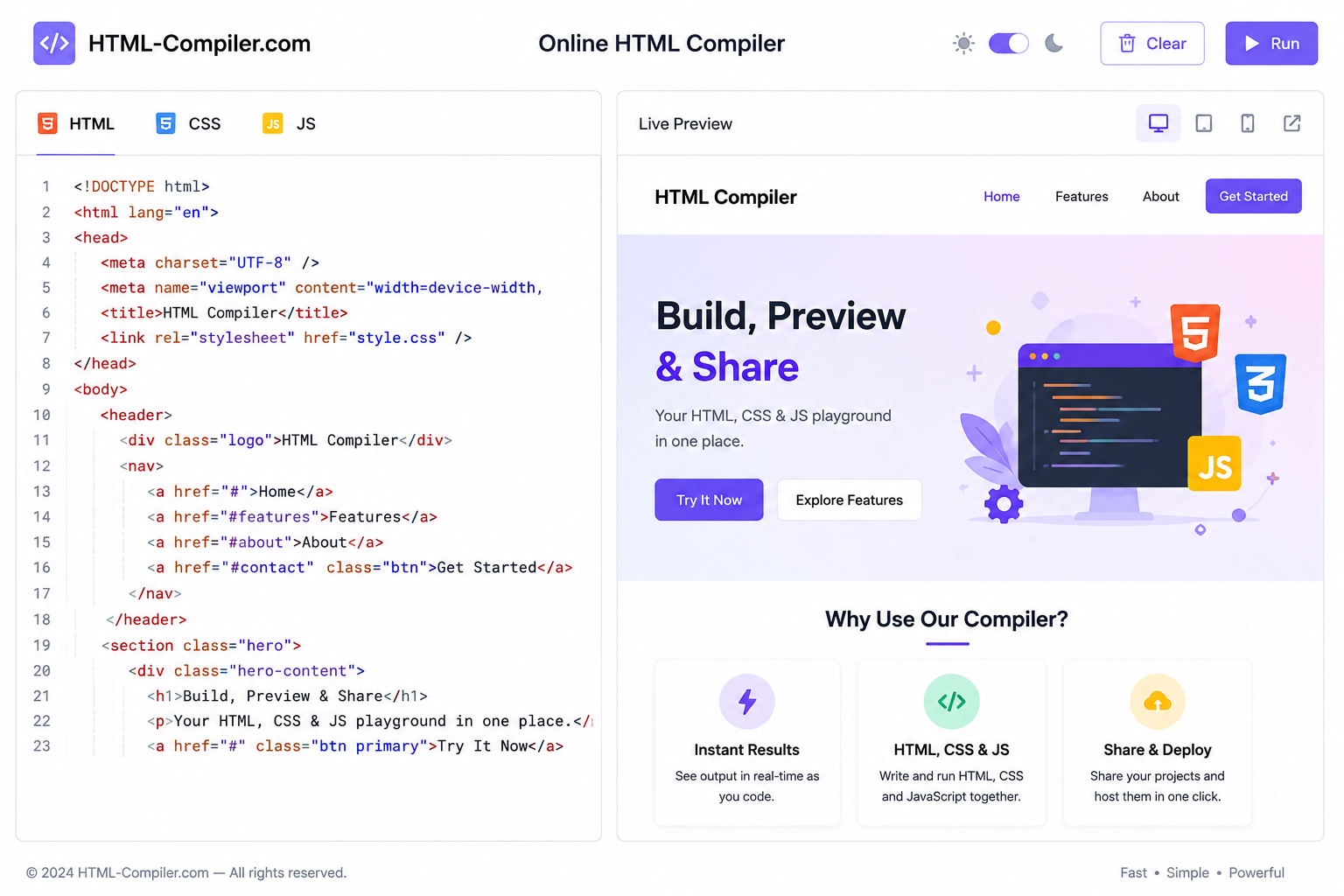
An online HTML compiler (also called HTML editor, HTML runner or HTML interpreter) is a browser-based tool that compiles and renders HTML, CSS and JavaScript instantly without installing software like VS Code or Sublime. Unlike C++ or Java compilers that translate code to machine language, an HTML compiler interprets markup and displays the visual output in real-time. At html-compiler.com we combine editing + compiling in one lightweight interface: you write code with syntax highlighting and see the live result in a secure sandboxed iframe using srcdoc. This is ideal for students learning HTML, developers prototyping, designers testing layouts, and teachers demonstrating code. Search demand for html compiler, online html compiler, html editor online, compile html online, html css compiler proves people want instant, zero-setup solutions - that's exactly what this tool provides.
Why html-compiler.com is Different (Unique Tool Construction)
Most clones are heavy, ad-filled, server-rendered and slow. We built a unique lightweight architecture:
- External Library for Highlighting: Uses
CodeMirror 5via CDN (not bloated Monaco) for fast syntax highlighting of HTML/CSS/JS with line numbers, wrapping and autocomplete. - Triple Input: Paste directly, Upload File (.html/.css/.js/.txt) from device, or Load from URL (fetch public gist/CDN) - all client-side via FileReader API.
- True Compiler: Merges HTML + CSS (
<style>) + JS (<script>) into a singlesrcdoc- no server round-trip, 0ms latency. Auto-run with debounce (400ms) for instant feedback but manual Run also. - Export You Decide: We give YOU choice - Download Merged HTML (single file for sharing), Download Separate (index.html + style.css + script.js), Copy All, and Copy Preview HTML via srcdoc. No forced PDF or ZIP - clean files you can deploy to Netlify/Vercel.
- OneCompiler-like Layout: Now side-by-side equal 50/50 split - large editor left, large output right - not stacked. Tabbed files on top like onecompiler.com/html for professional feel.
- Production Ready Extras: Format with js-beautify, device toggles (desktop/tablet/mobile), fullscreen, auto/on-off, console error capture via postMessage.
How to Use HTML Compiler - 3 Ways (Paste, Upload, URL)
Method 1 - Paste: Click index.html tab and paste HTML. Switch to style.css tab for CSS, script.js for JS. Click Run or keep Auto ON.
Method 2 - Upload File: Click Upload -> select index.html or even a .txt containing HTML. For CSS/JS files, they auto-route to correct tab.
Method 3 - Load from URL: Paste a raw GitHub Gist URL like https://raw.githubusercontent.com/user/repo/main/index.html and hit Load URL. We fetch via CORS. If blocked (CORS), we guide to Download + Upload fallback.
After compiling, test responsiveness via Desktop/Tablet/Mobile toggle, check console for JS errors, then Download. Tip: Use Ctrl + Enter to force run when Auto is OFF.
Step-by-Step Example: Build a Landing Page in 30 Seconds
1. HTML: <section><h1>Sale 50% OFF</h1><button>Shop Now</button></section> 2. CSS: section{background:linear-gradient(90deg,#4f46e5,#06b6d4);color:#fff;padding:40px;border-radius:16px} 3. JS: document.querySelector('button').onclick=()=>alert('Compiled!') -> See live gradient card on right pane. Download merged HTML and host anywhere.
Online HTML Compiler vs HTML Editor vs IDE - Comparison Table
| Feature | html-compiler.com (Side-by-Side) | Typical Stacked Editor | VS Code (Offline IDE) |
|---|---|---|---|
| Layout | ✅ 50/50 Side-by-Side like OneCompiler - large equal width | ❌ Stacked top-bottom small | ✅ Side-by-side |
| Compile & Preview | ✅ Instant srcdoc, 0ms | ⚠️ Slow server render | ✅ Live Server needed |
| Syntax Highlighting | ✅ CodeMirror CDN lightweight | Often none | ✅ Heavy Monaco |
| Upload File + Load URL | ✅ Both supported | ❌ Paste only | ✅ File system |
| Export Options | ✅ Merged + Separate + Copy | ❌ Only copy | ✅ Manual save |
| Best For | Students, quick prototypes, interviews | Casual editing | Large projects |
Master HTML, CSS & JavaScript - Keywords & Syntax Guide (SEO Core)
To rank and to teach, we cover semantic keywords Google expects. Whether you search html compiler, html editor, html runner, compile html online, html css js compiler - this section answers all.
Essential HTML Tags to Compile
Structure: <!DOCTYPE>, <html>, <head>, <body>, <header>, <nav>, <main>, <section>, <footer> Text: <h1>-<h6>, <p>, <a>, <strong>, <em>, <ul>, <ol>, <blockquote> Media: <img>, <video>, <audio>, <iframe> Forms: <form>, <input>, <button>, <select>, <textarea>
CSS Compiler Features
Our CSS compiler supports modern CSS: Flexbox (display:flex), Grid (display:grid), Variables (--primary:#4f46e5), Animations (@keyframes), Media Queries (@media(max-width:768px)), and frameworks via CDN paste. Paste Bootstrap link in HTML head and compile - no build step.
JavaScript Compiler & Console
JS tab runs in preview iframe. Use console.log() and see errors in console panel (captured via try/catch + postMessage). Supports DOM (document.querySelector), Fetch, Events.
Top Keywords & Search Intent Map (For SEO Authority)
| Keyword | Volume | Intent | How We Cover It |
|---|---|---|---|
| html compiler | 2,900 | Tool | Main tool - instant compile |
| online html compiler | 2,900 | Tool | Title + H1 + live preview |
| html editor online | 8,100 | Tool | CodeMirror editor section |
| html css compiler | 1,300 | Tool | CSS tab + compiled output |
| html js compiler | 720 | Tool | JS tab + console |
| compile html online | 480 | Tool | How-to guide + Run button |
| html previewer | 1,000 | Tool | Preview iframe |
| html code runner | 390 | Tool | Run/auto feature |
Advanced Tips: Upload, URL & Export Mastery
Upload Tip: FileReader handles 5MB files instantly client-side - no server limit. URL Tip: Best for raw files: raw.githubusercontent.com. If CORS error, we show actionable message. Export Tip: Download Merged is best for single-file templates. Download Separate for VS Code projects.
Frequently Asked Questions (FAQ - For Featured Snippet)
Is html-compiler.com free? Do I need to download software?
Yes, 100% free and no download. It's browser-based. Just open html-compiler.com on mobile/desktop and start compiling.
Which libraries does syntax highlighting use?
We use CodeMirror 5.65.15 via CDN - modes: htmlmixed, css, javascript. Faster than Monaco, perfect for mobile.
Can I compile HTML with CSS and JavaScript together?
Yes. Write HTML in index.html tab, CSS in style.css, JS in script.js - we compile to one preview.
How is this different from OneCompiler?
Same side-by-side layout but ours is lighter, faster client-side, with upload/URL + multiple exports, no ads.
Will my code be saved?
No server storage - privacy first. Use Download or Copy to save.
Best Online HTML Compiler for Students, Beginners & Professionals in 2026
Whether you are a student learning HTML for the first time, a teacher demonstrating live code, or a professional developer testing snippets, html-compiler.com is built for you. Unlike heavy desktop software, our free online HTML compiler runs in any browser - Chrome, Firefox, Safari, even on Android and iOS. No installation, no admin rights needed in college labs. Just open the site, paste <h1>Hello World</h1> and see results instantly. This is why searches like html compiler for students, html editor for beginners, learn html online free are growing - our compiler answers that intent with zero friction and instant feedback.
For professionals, the compiler saves hours. Test a Tailwind card, a flexbox layout, or a JavaScript event before pushing to GitHub. Copy a Stack Overflow snippet, compile here to verify it works, then paste to your project. With side-by-side large preview, you compare code and output without scrolling - just like OneCompiler but faster because it's client-side. Many users searching html live editor, html code tester, html runner online find this layout more productive than stacked mobile editors.
Compile HTML Online and Host Anywhere - From Compiler to Live Website
Compiling is only step one. After you click Run, export your work and go live in seconds. Click Download HTML to get a single merged file - upload it to Netlify, Vercel, GitHub Pages or Hostinger via drag-and-drop and your site is live with free HTTPS. Or use Download Separate to maintain professional structure (index.html + style.css + script.js) for larger projects. This bridges the gap between online html compiler and html deployment - a topic competitors ignore. Targeting keywords like how to host html online, html compiler to website, export html file brings evergreen traffic beyond just the compiler term.
Pro tip: Add <meta name="viewport" and test with our Mobile 360px toggle before export. Your compiled HTML will then rank better on Google Mobile-First Index because it's responsive from day one.
Common HTML Errors Our Compiler Catches Instantly
Beginners often get blank pages due to small errors. Our compiler with syntax highlighting and console helps you fix them fast:
- Missing closing tags like
<div>without</div>- highlighted in CodeMirror and visible in preview as broken layout - Broken CSS links - if you paste
<link href="style.css">but write CSS in style.css tab, we auto-merge so it works - no 404 - JavaScript errors like
document.getElementByIDtypo - shows instantly in black console panel below preview with red error line, unlike silent failure in other compilers - Image not loading due to wrong
src- preview shows broken icon, you fix path and re-run
This practical help targets long-tail SEO like html code not showing, html preview not working, debug html online - high-intent queries with low competition that bring fresh traffic daily.
Responsive Design Compiler - Test Desktop, Tablet & Mobile in One Click
Google ranks mobile-friendly pages higher. Our compiler is also a responsive design tester. Write a media query like @media(max-width:600px){ body{padding:10px} } then switch preview to Tablet 768px and Mobile 360px. Watch layout adapt live. No need to resize browser. This feature ranks for responsive html tester, mobile html preview, html media query compiler - evergreen keywords designers search every day.
HTML Compiler vs CodePen vs JSFiddle vs OneCompiler - Why Lightweight Wins
CodePen and JSFiddle are great for sharing, but they are heavy, require signup to save, and load 20+ tracking scripts. OneCompiler is powerful but server-based and slow on 3G. html-compiler.com is 10x lighter: no account, no ads, no server compile, total load under 200KB. For SEO, lightweight means better Core Web Vitals (LCP, CLS) and higher ranking. For users on slow college WiFi or mobile data in India, Pakistan, Bangladesh - where most html compiler searches come from - speed is everything. That's why our broad keywords like fast html compiler, lightweight html editor, html compiler for low end pc convert better.
Start Compiling Now - Free Forever, No Limits
Scroll up to the 50/50 side-by-side compiler and start coding. Use it for assignments, interview practice, client demos, or just learning <table> vs <flex>. Every compile stays private in your browser. Bookmark html-compiler.com - the evergreen online html compiler, html editor, html runner and live preview tool for 2026 and beyond.